The AI news that matters, twice a day
A Telegram bot that reads the AI, DevTools and DevOps sources worth reading, filters them down to what you actually work on, and sends the result to your chat. No feed to scroll, no account to create.
@OLYTech_AI_News_botThree steps, then it runs on its own
Press start and you are subscribed, with deliveries at 09:00 and 19:00 Cairo time. Everything after that is optional.
Start it
Open the bot in Telegram and press start. You are subscribed straight away, with deliveries at 09:00 and 19:00 Cairo time.
Set your times
Keep those two, or pick your own with /schedule 07:30 21:00. Pause whenever you want and resume without losing your settings.
Read what matters
Each article arrives as one clean message: headline, source, time, topic badges and a button that opens it. Or ask for it early with /now.
Signal, not a firehose
Curated sources, not a firehose
Ten feeds by default — OpenAI, DeepMind, Google AI, Meta Research, InfoQ, Techmeme, TechCrunch AI, The Verge, ZDNet and Ars Technica.
Filtered to what you work on
A keyword filter covering LLMs and labs, agents and RAG, vector databases, DevTools, CI/CD, cloud and GPU hardware. The rest never reaches you.
Topic alerts at a set time
Track one subject on its own schedule. /addevent 05:00 chat-gpt sends you that topic every morning at five, alongside your normal deliveries.
Nothing arrives twice
Every delivered article is recorded, so a story that appears in three feeds still only reaches you once.
Your own feeds
Add any RSS URL with /subscribe and it joins your deliveries. /sources lists what is active, /unsubscribe drops one.
Tagged at a glance
Each article carries up to three badges — LLM, DevTools, DevOps — so you can tell from the notification whether it is worth opening.
What it actually looks like
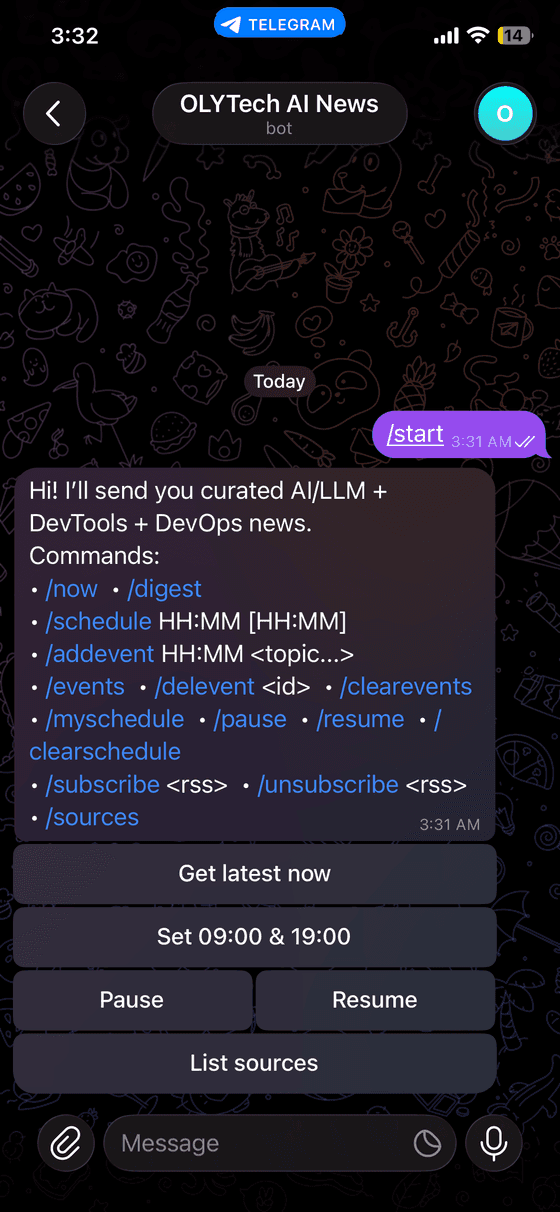
Press start
and you are subscribed
The welcome message lists every command, and the buttons underneath cover the ones you use daily — latest now, the standard 09:00 and 19:00 pair, pause, resume, and your source list.

One message
per article
Headline, the source and its timestamp, the topic badges, and a preview card. The button underneath opens the article without leaving Telegram.
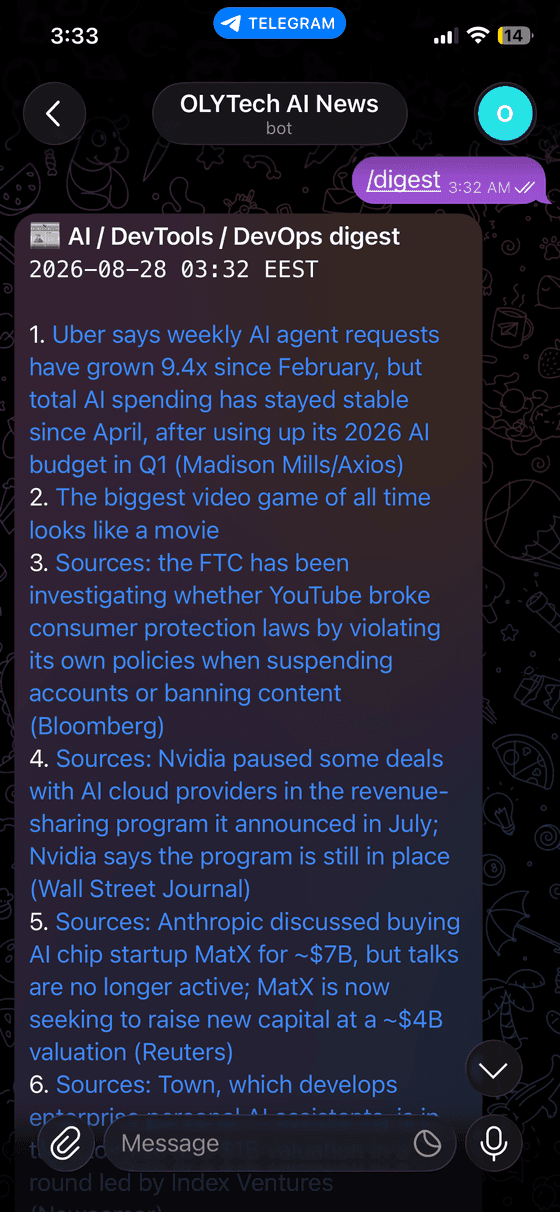
Or the whole lot
in a single digest
Ask for /digest and the top ten arrive as one numbered list instead of ten separate notifications. Useful when you have been away.
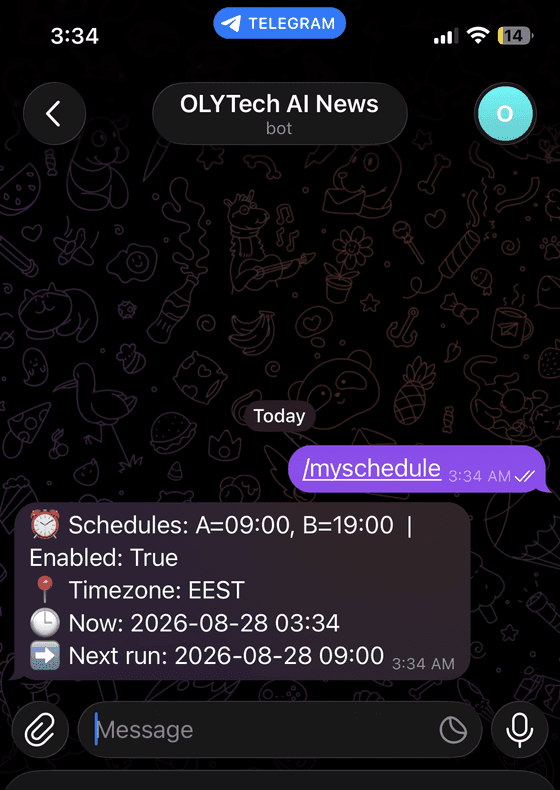
Your times
and when the next one lands
/myschedule shows both delivery slots, whether they are enabled, the timezone being used, and the exact moment of the next run.
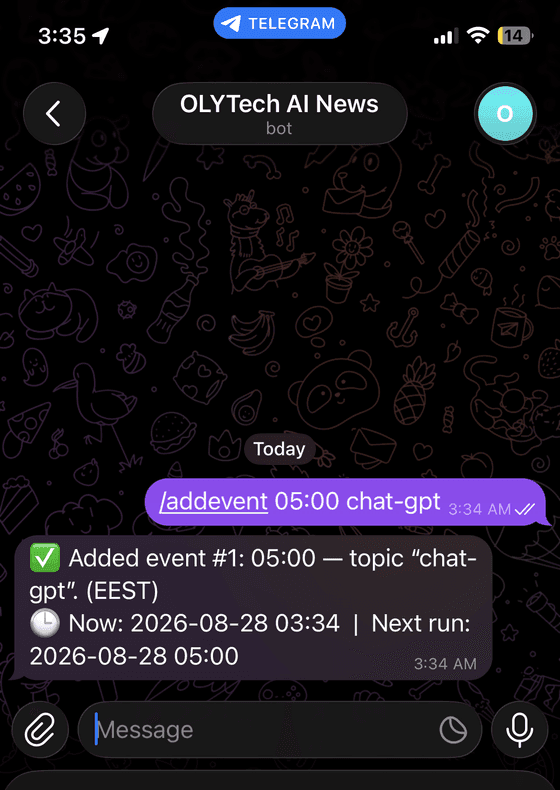
Follow one topic
on its own schedule
One line sets a standing alert: the topic, the time, and confirmation of when it first fires. It runs alongside your normal deliveries, not instead of them.

Every source
yours to change
The ten defaults, plus anything you have added yourself. Each one can be switched off without touching the rest.
Everything it answers to
Type these in the chat. The common ones also appear as buttons, so most days you never type anything.
- /now
- The latest matching articles, immediately.
- /digest
- One compact message with the top links instead of one message per article.
- /schedule HH:MM [HH:MM]
- Set one or two daily delivery times, in Cairo time.
- /myschedule
- Show your current times and when the next delivery lands.
- /pause
- Stop scheduled deliveries without losing your settings.
- /resume
- Start them again.
- /clearschedule
- Remove your delivery times altogether.
- /addevent HH:MM <topic>
- Follow one subject at its own time, e.g. /addevent 05:00 chat-gpt.
- /events
- List your topic alerts with their id numbers.
- /delevent <id>
- Remove one alert by its id.
- /clearevents
- Remove all of them.
- /subscribe <rss url>
- Add any RSS feed to your deliveries.
- /unsubscribe <rss url>
- Stop pulling from a feed.
- /sources
- List the feeds currently active for you.
Before you press start
Nothing. Open it in Telegram, press start, and it runs. There is no account to create and no payment step.
Open it and press start
It takes one tap. Nothing to install, nothing to pay for, and you can pause it whenever it stops being useful.