A till, and everything behind it
A shop is not a restaurant. Nobody is holding a table; someone is standing at a counter with an armful of things and wants to pay. This is that system — the catalogue with photos and prices, the till the cashier actually uses, and the unglamorous work that has to be done before a shop can open at all.
Clothing · Toys · Cafe · or whatever you sellFrom the shelf to the till to the day's takings
Each of these is a working part of the demonstration, not a roadmap item.
A catalogue with pictures
Every item has a photo, a price and a category, so the cashier taps a picture rather than hunting a code. Categories are the strip along the top of the till, in the order you decide.
Barcodes that exist
Odoo will store a barcode. It will not invent one, and nobody types two thousand of them. This generates valid EAN-13 codes in the range reserved for in-store use, in bulk, and never overwrites one already printed.
Shelf labels you can print
A sheet of shelf-edge labels — name, price and a scannable barcode — for one item or a whole category. Printed from the same record the till sells from, so the shelf and the screen cannot disagree.
Margin where you can see it
Cost sits behind the accounting app in a stock Odoo. Here margin and margin percent are on the item and in the catalogue list, so a mispriced line is visible while you are looking at the shelf.
Sizes and colours
One Cotton T-Shirt the buyer orders; twelve barcodes the shop actually sells. Variants are generated from the attributes, each with its own code and its own label.
More than one shop
Each till knows what kind of shop it is and shows only that catalogue. A clothes shop, a toy shop and a cafe run side by side in one system without the cashier scrolling past someone else's stock.
Taking the money
Cash, card or customer account, a receipt with the shop's own name and footer, and a session that closes and reconciles at the end of the day.
Takings, with margin
What sold, in which shop, at what margin — by item, by category, by day. The shop type and the cost are stamped onto each line at the moment of sale, so changing a till later cannot rewrite last month.
The running system, not a mockup
Captures from the running system with a week of trading seeded into it. The shops and the figures are invented; the behaviour is real.
Example dataEvery figure in these screens is example data. The shops, the items, the prices and the takings are invented for the demonstration — they are not a price list, and not anyone's results.
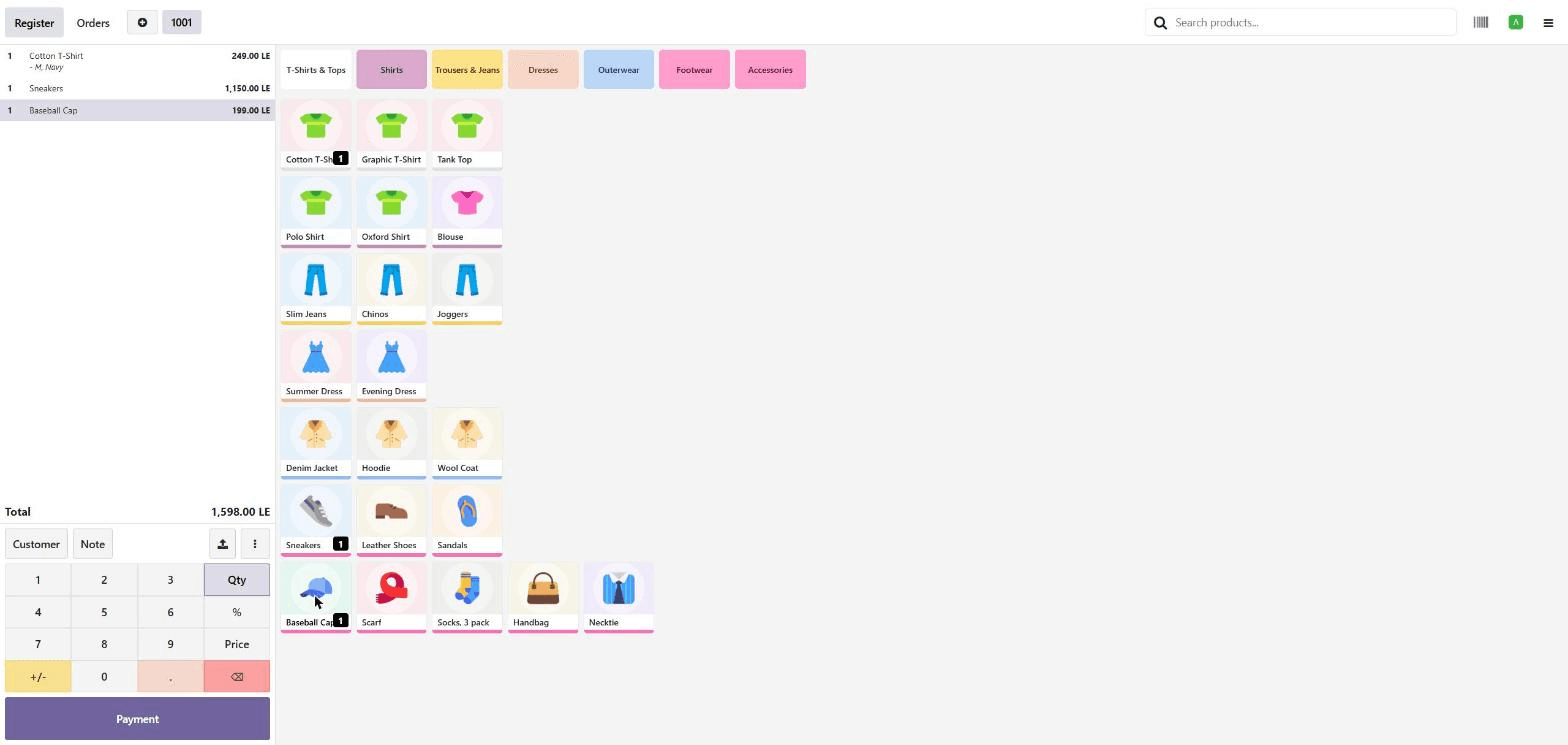
The till the cashier uses
Categories along the top, items as pictures, the basket down the side with the running total. The cashier taps what the customer put on the counter — no code to remember and no menu to learn. The shirt on this order went in as M, Navy.
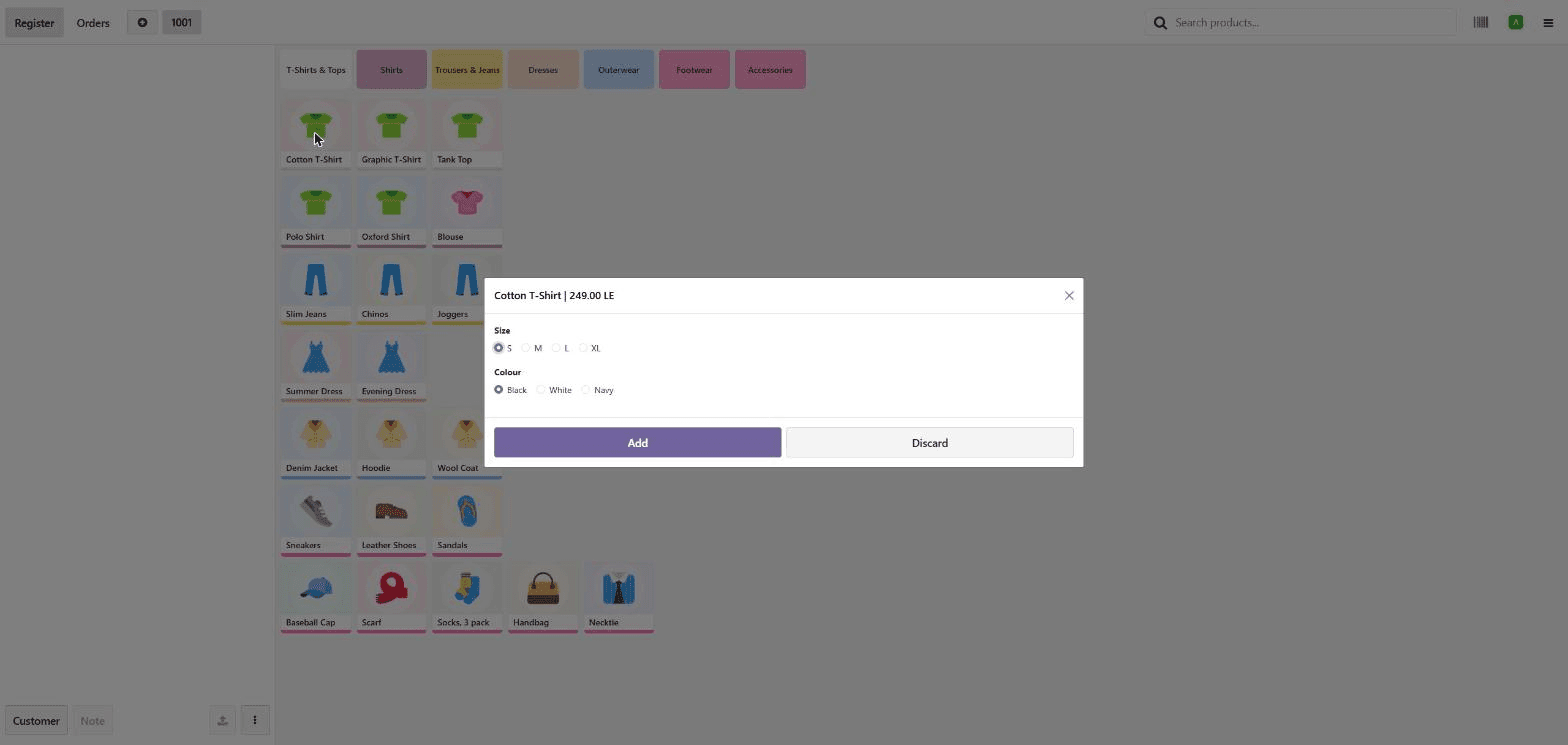
Size and colour, at the counter
Tapping an item that comes in variants asks which one before it joins the basket. The shop sells a specific medium navy shirt, and that is the line that appears on the receipt and comes off the shelf.
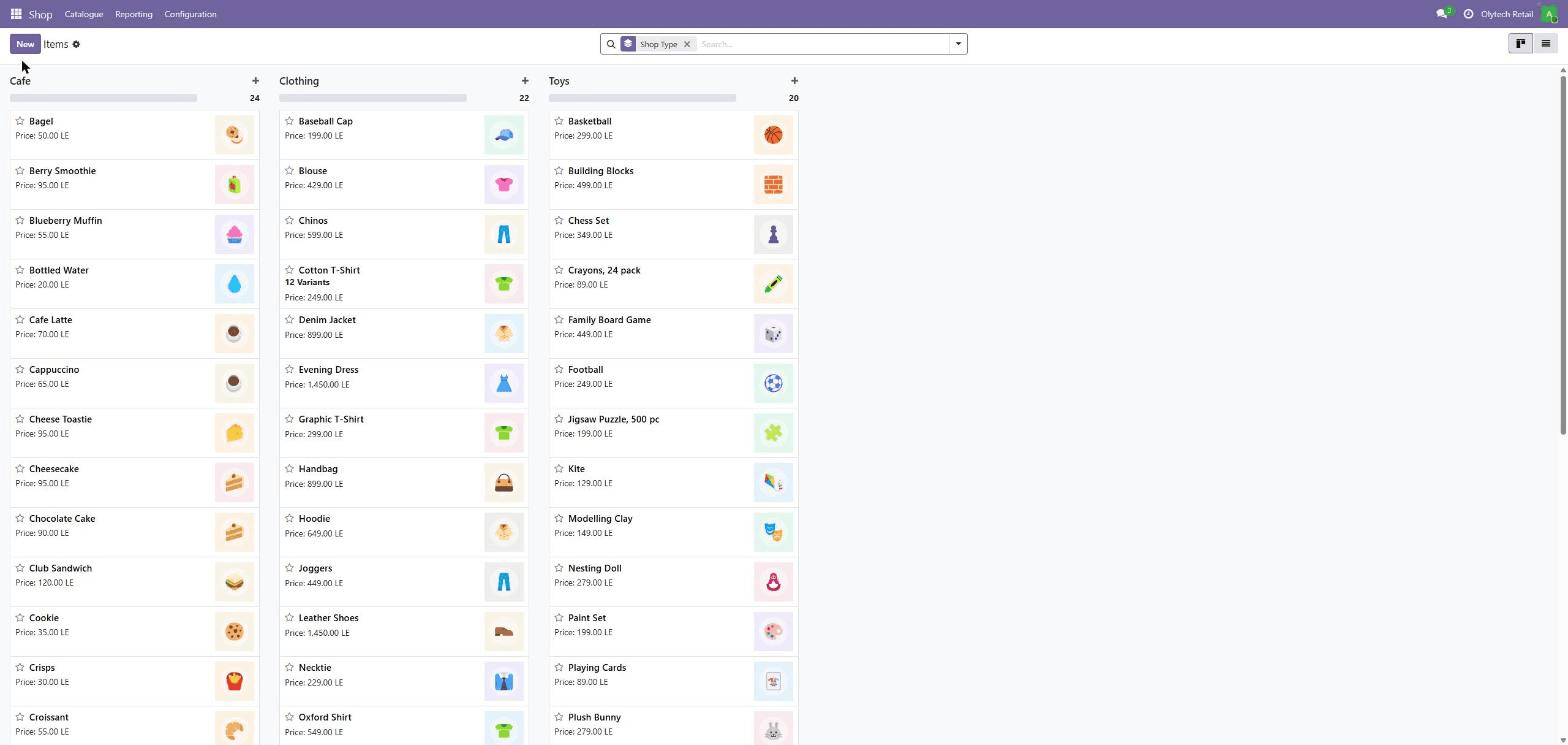
Three shops, one catalogue
Clothing, toys and a cafe side by side, each item with its picture and price. Every till sees only its own column, so a cashier never scrolls past someone else's stock.
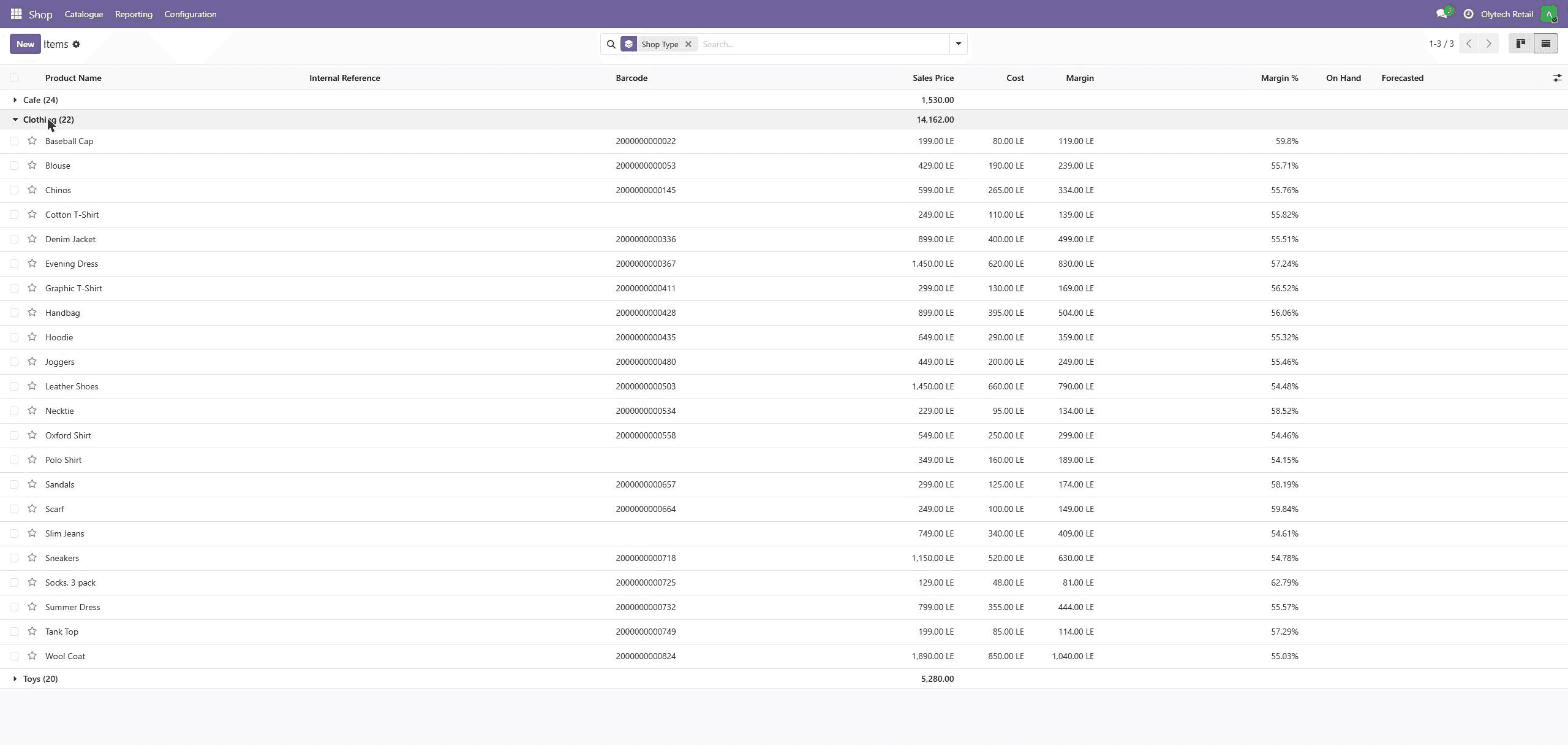
Price, cost, margin, barcode
The list a shop owner actually needs: what it sells for, what it cost, what that leaves, and the code on the label. A mispriced line shows up here rather than at month end.
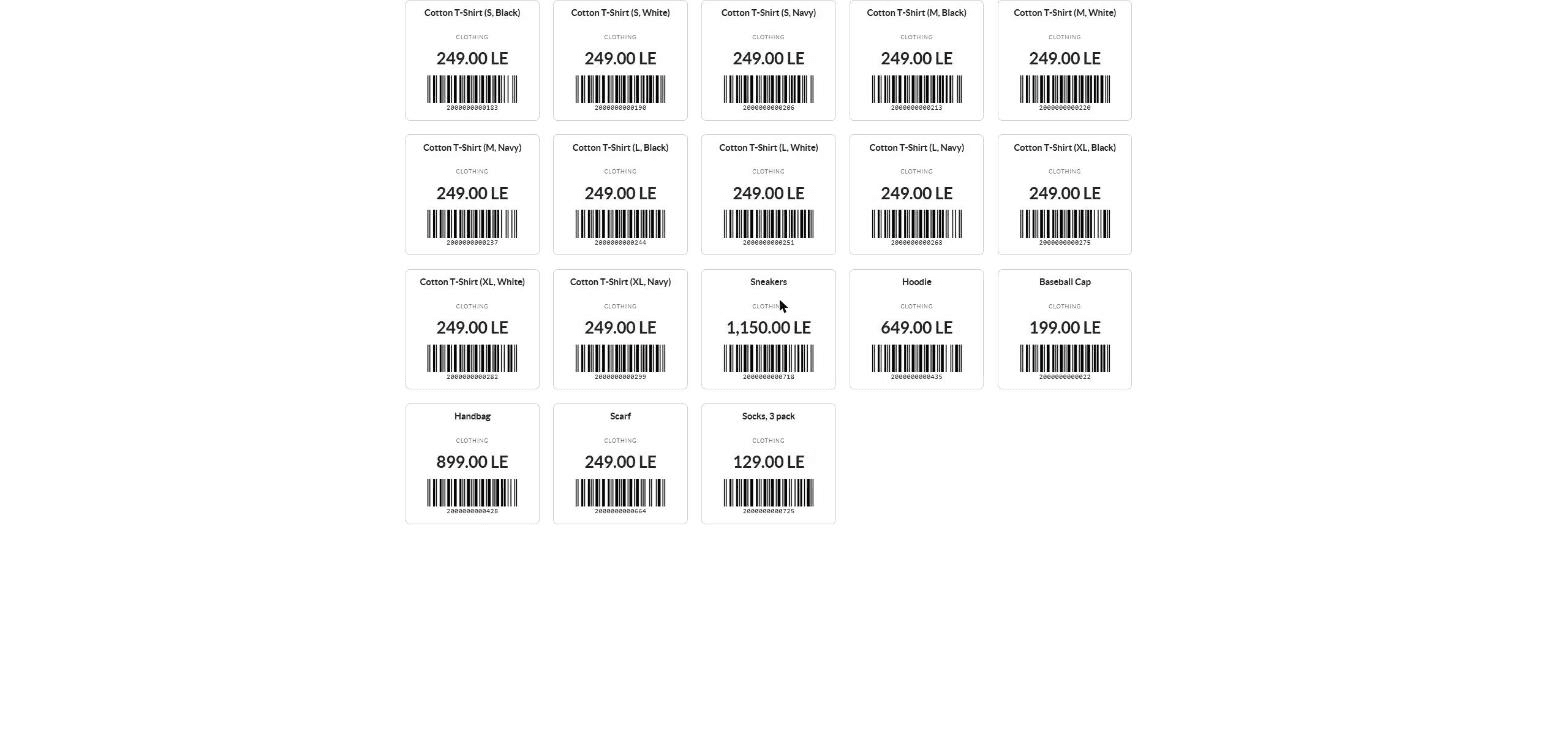
Shelf labels, ready to cut
Printed from the same records the till sells from, so the shelf price and the counter price are the same number by construction. Every size and colour has its own code — twelve labels from one shirt.
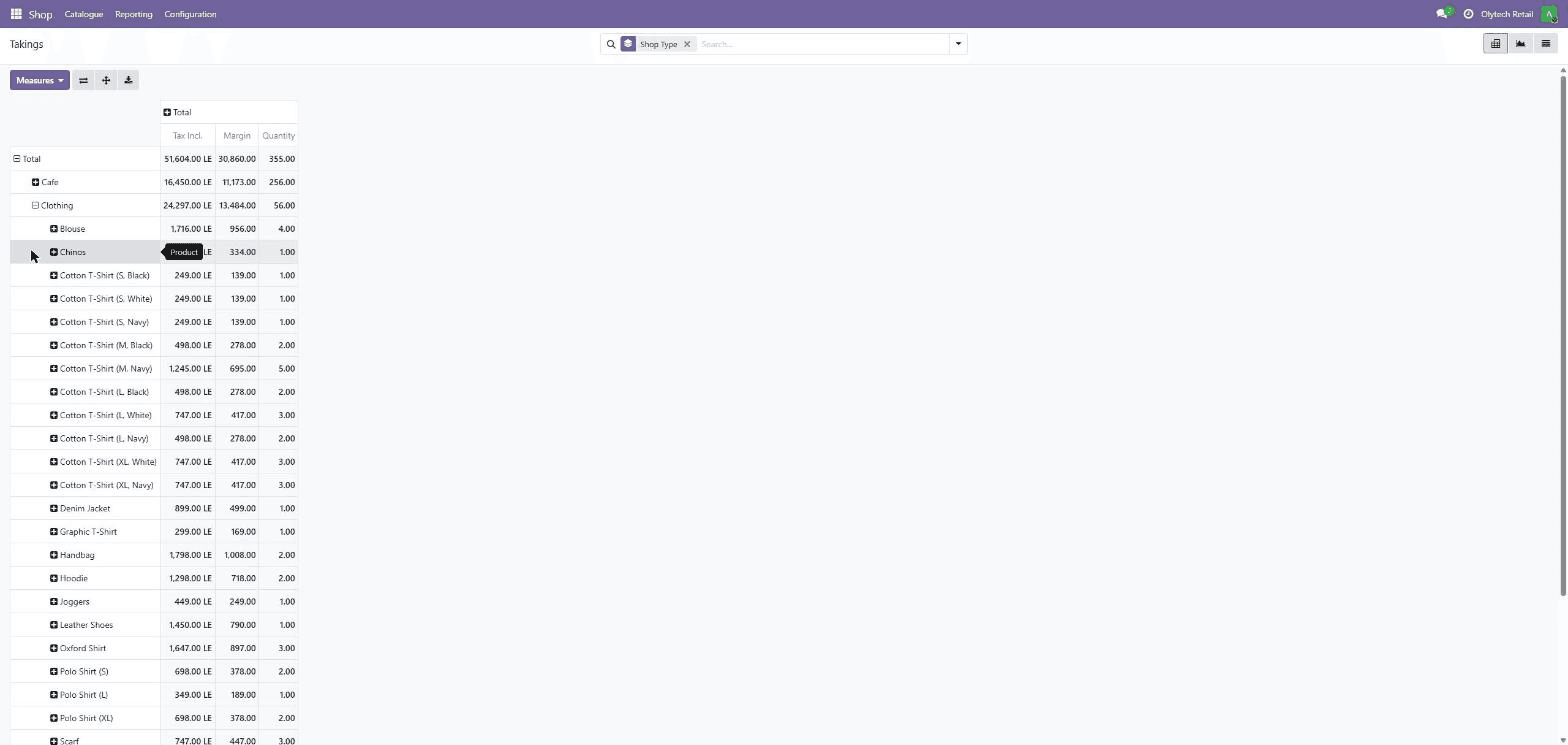
The week, down to the variant
Takings and margin by shop, opened up by item. It goes all the way down to the medium navy shirt: five sold, and what they left after cost.
The work before the doors open
Point-of-sale software is the easy half. The half that stops a shop opening is two thousand items that need a code, a price on the shelf and a cost behind them — and that is the work a stock install leaves you to do by hand.
- 01
Codes, generated not typed
Barcodes are allocated from the 200 prefix, the range GS1 reserves for a shop's own use, so a generated code can never collide with a real manufacturer's. The check digit is computed properly, which is what makes it scan. Anything that already has a code keeps it — a label out on the shelf is the authority, not a regeneration.
- 02
Labels off the same record
The shelf label is printed from the item the till sells, so the price on the shelf and the price at the counter are the same number by construction rather than by discipline. Labels print per variant, because it is the medium navy shirt that goes on a shelf, not the idea of a shirt.
- 03
Margin in front of you
Every item carries what it cost and what it sells for, and the difference is on the list next to the price. An item with no cost recorded shows no margin rather than a hundred percent — missing data is missing data, and the flattering version of that number is how a shop convinces itself it is doing well.
Three catalogues, one system
Three, not one, because the point is that the system is not built around a single trade. Yours gets its own catalogue built the same way, or your existing product list imported into it.
Clothing
22 items, seven categoriesT-shirts through to accessories, with size and colour variants on the lines that need them.
Toys
20 items, six categoriesSoft toys, building and puzzles, games, outdoor, vehicles and craft.
Cafe
24 items, six categoriesHot and cold drinks, pastries, cakes and sandwiches, over the counter rather than to a table.
What this is, stated plainly
This is a demonstration we built and run ourselves, not a client deployment. It exists so a shop can see a real till ringing up real items before commissioning anything, and so scoping starts from a working screen instead of a slide.
- Platform
- Odoo 19 Community, with custom modules built for retail
- In the demonstration
- Three shops, 66 items, all priced, coded and photographed
- Money
- Egyptian pounds, on the Egyptian chart of accounts
- Status
- Built and running, ready to walk through on request
From this till to yours
The walkthrough is the first step, and it costs you an hour rather than a commitment.
We walk you through it live
A real till on screen, driven end to end — find an item, scan it, take the money, print the receipt, then look at what the day made and at what margin. You ask what happens when your shop does something awkward, and we show you.
We start from your product list
Whatever the catalogue lives in now — a spreadsheet, a supplier file, a shoebox — that is the starting point. What your shop needs beyond the demonstration is scoped in writing before anything is built.
Built out from here, in order
Stock that moves when something sells, tax lines for a registered shop, purchasing so costs stay current, a second branch. Each is scoped on its own rather than promised as a bundle.
See a till ring up a real sale
Tell us what your shop sells and we will walk you through the working system end to end.